Quick Help · Step-by-step guide
What to Do When ThreatLocker Blocks an App
ThreatLocker protects your computer by checking every program that asks for administrator rights. When one isn't approved yet, it lets you ask us to approve it. Asking takes about a minute.
A block means ThreatLocker is working
Your computer is fine. The program simply isn't on your company's approved list yet. Installers and other programs that change your computer need our approval first. Most ransomware and viruses arrive as a program nobody approved, and this is the step that stops them.
Request approval
- 1
Choose Request ThreatLocker Elevation
When a program needs administrator rights, such as an installer, a box titled User Account Control asks “Do you want to allow this app to make changes to your device?” and names the program. Check that it is the program you just tried to open. Then click Request ThreatLocker Elevation.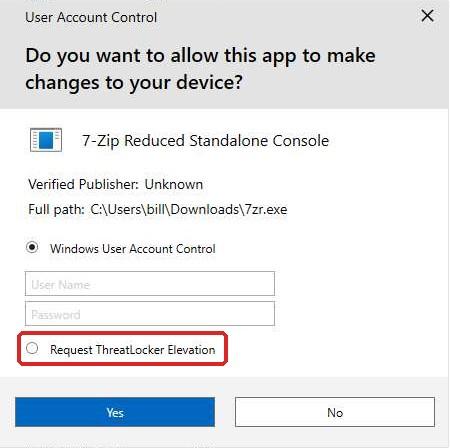
Leave the user name and password boxes empty. Those are for a technician signing in at your desk. - 2
Tell us who you are and why you need it
Two boxes appear. Type your email address in the first, so we can tell you the answer. In the second, give a short reason, such as “Zoom, for a client meeting at 2:00” or “Printer software for the new front desk printer.”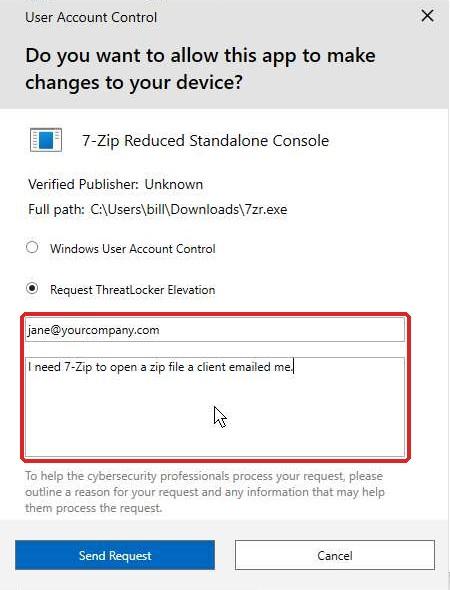
- 3
Click Send Request
Your request goes straight to the Mid Florida IT help desk, with the program's details attached. You don't need to send a separate email or open a ticket.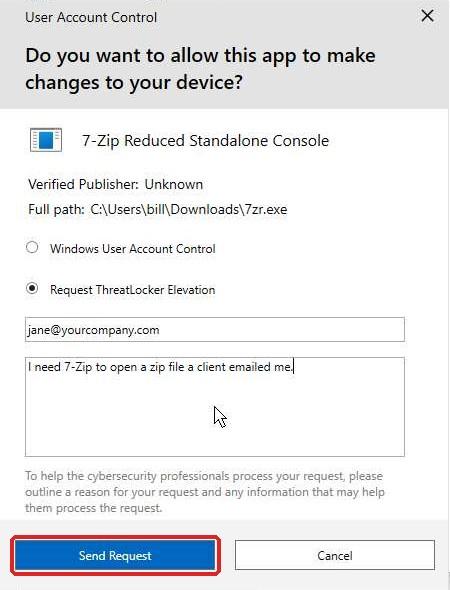
- 4
Wait for our answer
A technician checks the program and approves or denies it, and you hear back either way. Once it's approved, open the program again. Approval takes effect within about a minute.Don't try to get around the block. A different download of the same program, or a copy from a USB drive, gets blocked too, and some of those copies are how computers get infected.
If something doesn't work
- I closed the message before I sent a request
- Open the program again. The same box comes back, so you can choose Request ThreatLocker Elevation this time.
- I need it right now
- Send the request first, then call us at 863-301-4011. With the request already in, a technician can find it and review it while you're on the phone. Our help desk hours are Monday to Friday, 8:00 AM to 5:00 PM ET.
- My request was denied
- The denial says why. Usually the program is personal, unsafe, or does the same job as something you already have. If it's needed for work, reply to the email or call us, and we'll find an approved way to do it.
- A program I use every day is suddenly blocked
- An update can change a program enough that ThreatLocker sees it as new. Request access the same way. Mention that it's a program you already use, which helps us approve it quickly.
Need a hand?
Call Mid Florida IT and a technician will walk you through it.